

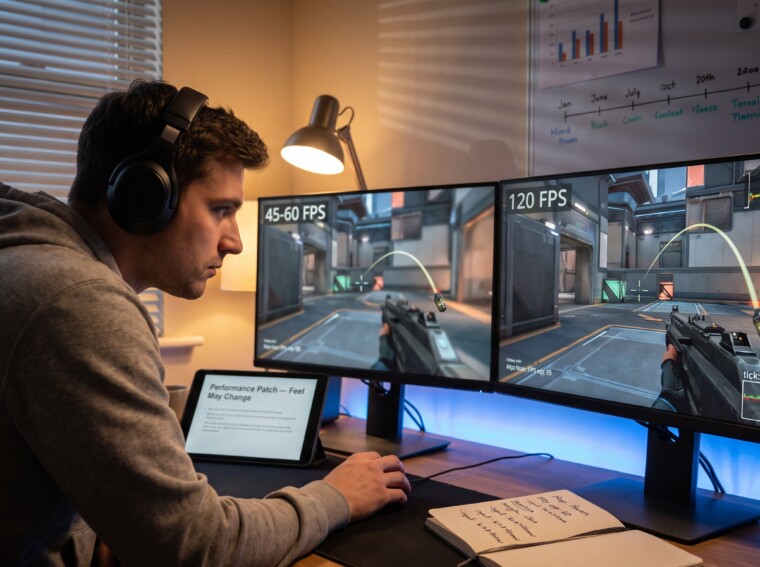
Why Some Game Updates Improve Performance but Change Gameplay happens when engineers alter low-level systems that control timing and simulation. Gamers often notice smoother frame rates, then a weapon feels snappier or a jump lands differently. This article explains the core technical reasons, the typical code and network changes that produce those shifts, and how players and teams should respond when performance patches change game feel.
Key Takeaways
- Game updates that improve performance often change gameplay because altering timing and simulation frequency affects game feel and input response.
- Performance improvements commonly involve changes to physics timing, frame rates, and network tick rates, which can shift movement, projectile behavior, and hit registration.
- Decoupling physics from frame rendering to use fixed timesteps enhances stability but can modify gameplay timing and mechanics.
- Developers balance better performance and gameplay integrity by using deterministic loops, telemetry, staged rollouts, and compensation adjustments.
- Players should actively test different settings, document exact conditions, and report issues with reproducible evidence to adapt to performance patches.
- Transparent patch notes and experimental branches help competitive players and communities adjust to gameplay changes caused by performance updates.
Why Performance Improvements Often Affect Game Feel
Fact: Changing performance systems changes how often and when the game updates, and that directly alters game feel.
When a studio optimizes rendering, physics, or networking, the engine may run certain calculations more often or at different times. A move from unstable 45–60 FPS to a locked 120 FPS reduces the interval between visual updates from ~22 ms to ~8 ms. That shorter interval changes input sampling, perceived latency, and the cadence of physics steps. Players notice this as crisper aiming, faster strafes, or altered jump timing.
Concrete example: an arena shooter patched to remove a per-frame physics dependency found that grenade arcs shifted by 3–6% at higher FPS. That number seems small, but for a player timing a bank shot, it changed outcomes in ranked matches.
Why it matters: esports scenes and dedicated hobbyists rely on consistent timing. A performance update can unintentionally advantage some tactics and disrupt practiced muscle memory. That’s why patch notes sometimes warn “feel may change”, it’s not marketing speak, it’s a timing change.
Common Technical Changes That Can Alter Gameplay
Fact: A few types of technical changes repeatedly show up as causes when gameplay shifts after an update.
Developers most often touch three areas: how the simulation ties to frames, physics solver settings, and network tick or interpolation logic. Switching to a fixed timestep, changing solver frequency, or improving interpolation all improve stability and fairness, but they also change exact positions, velocities, and collisions by small numerical amounts.
Those small numerical shifts accumulate in loops that control movement, projectile paths, and collision response. When experienced players test before and after, they often report differences in hit registration, projectile drop, or the timing of jump-cancels.
Practical note: when a patch touches any of these systems, QA teams should run specific regression tests across a range of FPS and ping values to measure perceptible differences.
Physics, Collision And Frame-Rate-Dependent Systems
Fact: Tying physics to frame rendering makes physics outcomes depend on FPS: decoupling fixes stability but can change feel.
Many engines originally update physics each render frame. If FPS changes, forces integrate differently and collision checks occur at different times. Moving to a fixed timestep (for example, a 60 Hz physics loop) makes motion deterministic across visual FPS, so a character’s jump height and projectile arc no longer vary with framerate. That resolves issues like faster movement at high FPS but can make timing-based tricks behave differently.
Specific numbers: a 120 FPS client using render-tied physics might take physics steps every 8.3 ms, while a fixed 60 Hz loop uses 16.7 ms steps. That doubling of step duration forces code to either subdivide steps (more work) or accept coarser simulation (different outputs). Improper subdivision can introduce slight rounding changes that alter outcomes by tiny margins, enough for precision players to notice.
Warning: When studios patch physics, rare states (like clipping through a thin obstacle) may appear or disappear. Players should document exact repro steps: map, weapon, FPS, and sequence of inputs so developers can compare before/after logs.
Network, Tick Rate And Input Latency Fixes
Fact: Changing server tick rate or client interpolation reduces jitter and latency but can shift perceived timing for hits and movement.
Server tick rate defines how often authoritative game state advances. Increasing tick from 20 Hz to 60 Hz reduces per-tick latency from 50 ms to about 16 ms, which improves responsiveness. But, higher tick rate also changes when collisions are resolved and which inputs win in tight windows. A peeker in an FPS may find that the timing of peeks and returns now favors different strategies.
Developers also tweak interpolation and extrapolation to smooth poor connections. Tightening interpolation reduces visual lag but can raise instances of ‘rubberband’ correction in bad networks: loosening it hides jitter but increases perceived input lag. Players should note that a change in interpolation settings can make strafing and aim tracking feel more or less accurate even with identical ping.
Verification tip: measuring frame and tick alignment helps. Tools and guides that show how to view FPS and input lag, such as practical FPS diagnostics, let players confirm whether a patch altered timing performance diagnostics.
How Developers Balance Performance Gains With Gameplay Integrity
Fact: Developers use deterministic loops, staged rollouts, and telemetry to protect gameplay while improving performance.
A reliable approach is to decouple visual frames from simulation using fixed timesteps with sub-stepping for accuracy. Studios run automated tests across FPS ranges and synthetic network conditions. They also stage updates with opt-in experimental branches so competitive players can validate changes before wide release.
Example: a mid-size studio rolled out a performance patch that increased average FPS by 35% but noticed a 2% rise in hit registration complaints. They responded by adding a narrowly scoped compensation layer that adjusted projectile drag coefficients to restore prior trajectories while keeping the improved frame pacing.
Helpful practice: teams publish detailed patch notes and testing instructions. Hobbyists and tournament organizers can follow these while tuning their setups. For readers wanting a broader update context from the same site, see the compact guide to site updates for release schedules and patch philosophies in the update hub update hub.
What Players Can Do: Test Settings, Report Issues, And Adapt
Fact: Players can reduce surprise by testing variations, collecting precise repro data, and adjusting settings.
Start by comparing behavior at different FPS caps and with V-Sync or adaptive sync on/off. Note exact values: FPS cap, measured frame time, server tick if visible, map, and action sequence. Use short recordings or input logs to show differences: a 10–12 second clip that reproduces a changed interaction carries more weight than a vague report.
Practical adjustments: lower or raise frame caps to match old timing, tweak mouse sensitivity to compensate for increased sampling, and experiment with interpolation or client-side prediction toggles if available. If a patch breaks a known trick or exploit, players should avoid abusing the new state and instead report with concrete repro steps.
Sources and further reading: players who want to track release cadence and coordinate testing can consult guides on tracking releases and early access workflows to time their participation and testing windows. A useful companion for timing tests is the guide on tracking release dates and update windows release tracking. For advice on what to check before applying large updates, see the pre-install checklist pre-install checklist.
Conclusion
Insight: Performance fixes change when and how often the simulation runs: that timing shift can change gameplay by design or side effect.
Players and developers can reduce friction by measuring, documenting, and iterating. When studios share detailed notes and provide experimental branches, communities adapt faster and competitive integrity holds. For ongoing patch tracking and broader update context, readers can follow related updates and post-release analysis on TheGameArchives and its update guides.