

Early access game updates shape a player’s experience from alpha builds to the final release. Early Access Game Updates let players test new features, find bugs, and influence development while accepting instability. This guide explains what to expect, how patches work, and how to take part without losing saves or time. It targets PC, console, and mobile players who want clear, practical steps for participating in living titles. Read on to learn which updates matter, how to read changelogs, and how to give feedback that actually helps developers.
Key Takeaways
- Early access game updates let players experience ongoing development while influencing features and balancing through active feedback.
- Understanding patch types—hotfixes, balance, content, and major updates—and update cadence helps players anticipate changes and plan play sessions.
- Reading detailed changelogs with platform tags and build numbers prevents surprises like save resets or staggered content releases.
- Backing up save files before major updates protects progress from potential data loss common in early access games.
- Providing clear, reproducible bug reports with specifics and constructive feedback through official channels helps developers address issues efficiently.
- Engaging respectfully and maintaining version history of testing notes enhances communication and strengthens your role as a valuable contributor in early access development.
What Early Access Means: Expectations, Risks, And Benefits
Fact first: Early access means the game is playable but unfinished and will change. Players buy into a work‑in‑progress to get early builds, help test features, and influence design. Expect missing content, balance tweaks, and frequent updates. Roadmaps and developer logs often outline what’s planned and when, but dates can shift.
Concrete benefits include funding for development and large‑scale playtesting. For example, small studios often avoid layoffs when early sales cover a three‑month sprint. Players get lower entry prices and a voice in decisions, feedback can flip priorities, like changing weapon damage or adding a requested mode.
Risks are tangible: builds can be unstable, save files may break, and some projects never reach a 1.0 release. One studio’s pivot can erase content players liked. Interest can fade if development drags: a smaller player base may reduce balance testing and community content. Players should weigh potential rewards against the chance the title remains unfinished.
Practical tip: read the developer’s roadmap and patch history before buying. That reveals cadence and priorities better than a single storefront blurb. For context on how publishers and outlets track updates, hobbyists can consult a broader resource like the complete updates guide maintained by TheGameArchives.
How Updates Work: Patch Types, Release Cadence, And Reading Changelogs
Answer: Updates come in predictable types and follow a cadence that signals stability. The four common patch types are hotfixes, balance patches, content updates, and major updates. Hotfixes land urgently to fix crashes or security problems: balance patches adjust numbers like weapon damage or economy: content updates add maps or items: major updates overhaul systems or introduce new modes.
Cadence matters. Early access games often ship weekly or biweekly fixes during active testing, with larger monthly content drops. A frequent small‑patch rhythm usually means developers are iterating quickly: long gaps can mean resource limits or major rewrites.
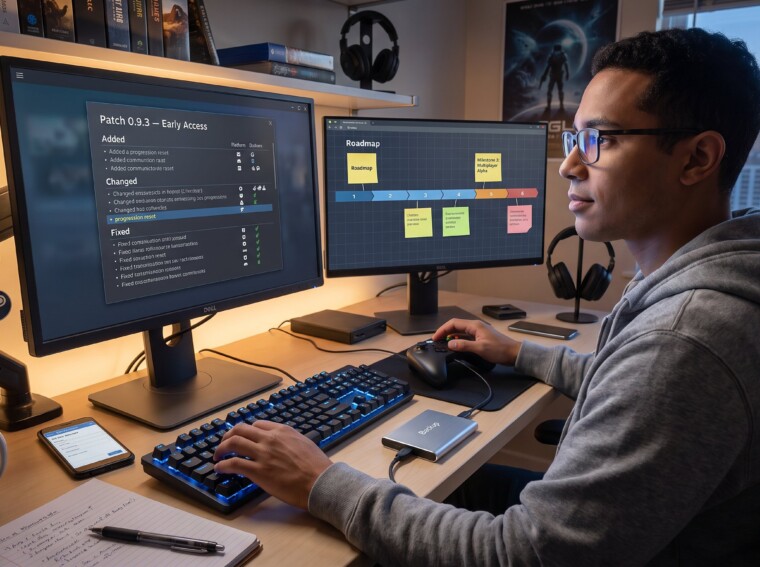
Reading changelogs: start with the summary lines, they list added, changed, and fixed items. Then scan grouped headers: gameplay, content, performance, known issues. A useful changelog includes build numbers, platform tags, and whether changes are temporary. If a note lists “progression reset,” that signals save risk. Example: a changelog that marks “fixed crash when loading checkpoint (PC build 0.9.3)” tells players the exact build to target.
Practical strategy: track release cadence with announcement pages and community threads. For tracking release dates across platforms, TheGameArchives has a practical walkthrough on synchronization and platform notes in their release tracking guide. That guide helps players plan backups and play sessions around major drops.
Warning: don’t assume “content added” means cross‑platform parity. Developers sometimes stagger releases between storefronts. Always read the platform tag in the changelog to avoid surprises.
How To Participate Smartly: Backups, Bug Reporting, And Constructive Feedback
Direct answer: protect your progress, report reproducible bugs, and give focused feedback. Back up save files before major updates. Many players manually copy save folders or use cloud saves when available. A real case: a tester lost eight hours of progression after an update that reset inventories: a simple backup restored progress in five minutes.
Bug reporting best practices: always include platform, build number, and exact steps to reproduce the issue. Attach screenshots or logs when possible. Prioritize high‑severity problems like crashes or blocked progression. Developers triage reports by severity: a clear report with reproduction steps is far more likely to be fixed quickly than an emotional post with no details.
Constructive feedback matters: separate bugs from preferences. If a weapon feels weak, describe the scenario (map, loadout, enemy type, numbers if known). If a mode feels slow, suggest a measurable change (reduce respawn time by 20% or add a 3‑minute timer). Use official channels, forums, in‑game tools, or surveys, so feedback reaches the pipeline. TheGameArchives explains what to check before installing large updates in their practical piece, which helps testers decide when to commit time to an unstable build: pre‑update checklist.
Community behavior tip: be specific, polite, and repeatable. Developers read hundreds of reports: a calm, detailed post with logs gets attention. Remember that developers can misinterpret tone, frustration can bury useful data. Finally, preserve a version history of your own testing notes: recording times, build numbers, and actions creates clear evidence when an issue resurfaces.
Additional resource: for deeper context on how updates change gameplay while improving performance, refer to the analysis at TheGameArchives on performance vs gameplay changes.
Conclusion
Early access is a trade: players accept technical risk for early play, lower prices, and influence. Understanding patch types, cadence, and effective feedback reduces risk and increases the chance a game reaches a polished release. Players who back up saves, report clear bugs, and use official channels become valuable testers and can steer development toward better outcomes. Those habits protect time, preserve progress, and make feedback matter.